Cloud Computing Projekt
Raspberry Pi Cluster mit KI-basierter Objekterkennung, MPI und Monitoring
Backend
This manual provides a guide for setting up and deploying the backend.
It consists of the following components:
| Component | Purpose |
|---|---|
| FastAPI | Provides the REST API and processes incoming events |
| PostgreSQL | Stores event and node metadata |
| SeaweedFS | Stores event images via S3-compatible API |
The Sensor Nodes send their detection events to the FastAPI backend via HTTP.
The backend stores metadata in PostgreSQL and the associated images in SeaweedFS.
flowchart TB
    SensorNodes["Sensor Nodes"]
    Backend["FastAPI Backend"]
    PostgreSQL[("PostgreSQL")]
    SeaweedFS[("SeaweedFS")]

    SensorNodes -->|"HTTP REST API"| Backend
    Backend -->|"Metadata"| PostgreSQL
    Backend -->|"Objects"| SeaweedFS
Table of Contents
Local Development
The following requirements need to be met:
- Docker and Docker Compose installed
- Git installed
Run the following commands from the backend directory:
cd code/backend
Start all services in detached mode
docker compose up -d
Check the running containers
docker compose ps
The FastAPI Swagger interface is available at
http://localhost:8000/docs
The SeaweedFS user interface is available at
http://localhost:8888
Stop the Services
docker compose down
Docker Swarm Deployment
The following requirements need to be met:
- Manager Node
- Docker Engine installed
- Docker Swarm initialized as the manager
- SSH access to all worker nodes
- Worker Nodes
- Docker Engine installed
- Joined to the Swarm as workers
- All nodes in
Readystate
The following ports must be allowed on all Swarm nodes so that they can communicate with each other.
| Port | Protocol | Purpose |
|---|---|---|
| 2377 | TCP | Swarm control plane |
| 7946 | TCP/UDP | Node discovery |
| 4789 | UDP | Overlay network (VXLAN) |
Allow these ports on all Swarm nodes
sudo ufw allow from <swarm-subnet> to any port 2377 proto tcp && sudo ufw allow from <swarm-subnet> to any port 7946 proto tcp && sudo ufw allow from <swarm-subnet> to any port 7946 proto udp && sudo ufw allow from <swarm-subnet> to any port 4789 proto udp && sudo ufw reload
Verify the firewall configuration with
sudo ufw status
Run the following command on the manager node
docker swarm init --advertise-addr <manager-ip>
The output contains a join token for worker nodes
docker swarm join --token SWMTKN-1-... <manager-ip>:2377
Run the join command on each worker node.
Verify that all nodes are registered on the manager afterward.
docker node ls
Build and distribute the Backend Image
docker build -t cloud-backend:latest .
Verify the image was created
docker images
Distribute the Image to Worker Nodes
docker save cloud-backend:latest | ssh pi@rpi1 docker load

# Transfer to all workers at once

for HOST in rpi1 rpi2 rpi3 rpi4 rpi5 rpi6 rpi7 rpi8
do
    docker save cloud-backend:latest | ssh pi@$HOST docker load
done
Verify the image on a worker node
ssh pi@rpi1 docker images
Deploy the Stack from the Manager Node
Set the public endpoint used in presigned image URLs.
Replace <node-ip> with an address that is reachable by the frontend or client:
export S3_PUBLIC_ENDPOINT=http://<node-ip>:8333
export SEAWEED_REPLICATION=001
The replication variable is optional. If it is not set, the stack uses 001 as its default.
docker stack deploy -c docker-stack.yml cloud
Check that all services are running
docker service ls
Verify that backend replicas have been scheduled successfully
docker service ps cloud_backend
This shows the state of each backend replica and on which Swarm node it is running
The FastAPI Swagger interface is available at
http://<node-ip>:8000/docs
The SeaweedFS user interface is available at
http://<node-ip>:8888
Verify the application and its dependencies:
curl http://<node-ip>:8000/health
The expected output looks as follows:
{
  "status": "System is healthy",
  "database": "ok",
  "storage": "ok"
}
Remove the deployed stack when it is no longer needed:
docker stack rm cloud
Backend Components in Operation
FastAPI REST API
FastAPI exposes a health endpoint as well as the Node and Event management endpoints through an automatically generated OpenAPI/Swagger interface.
The interface is available at http://<node-ip>:8000/docs after deployment.
Docker Swarm ingress makes the published service available through a reachable Swarm node.
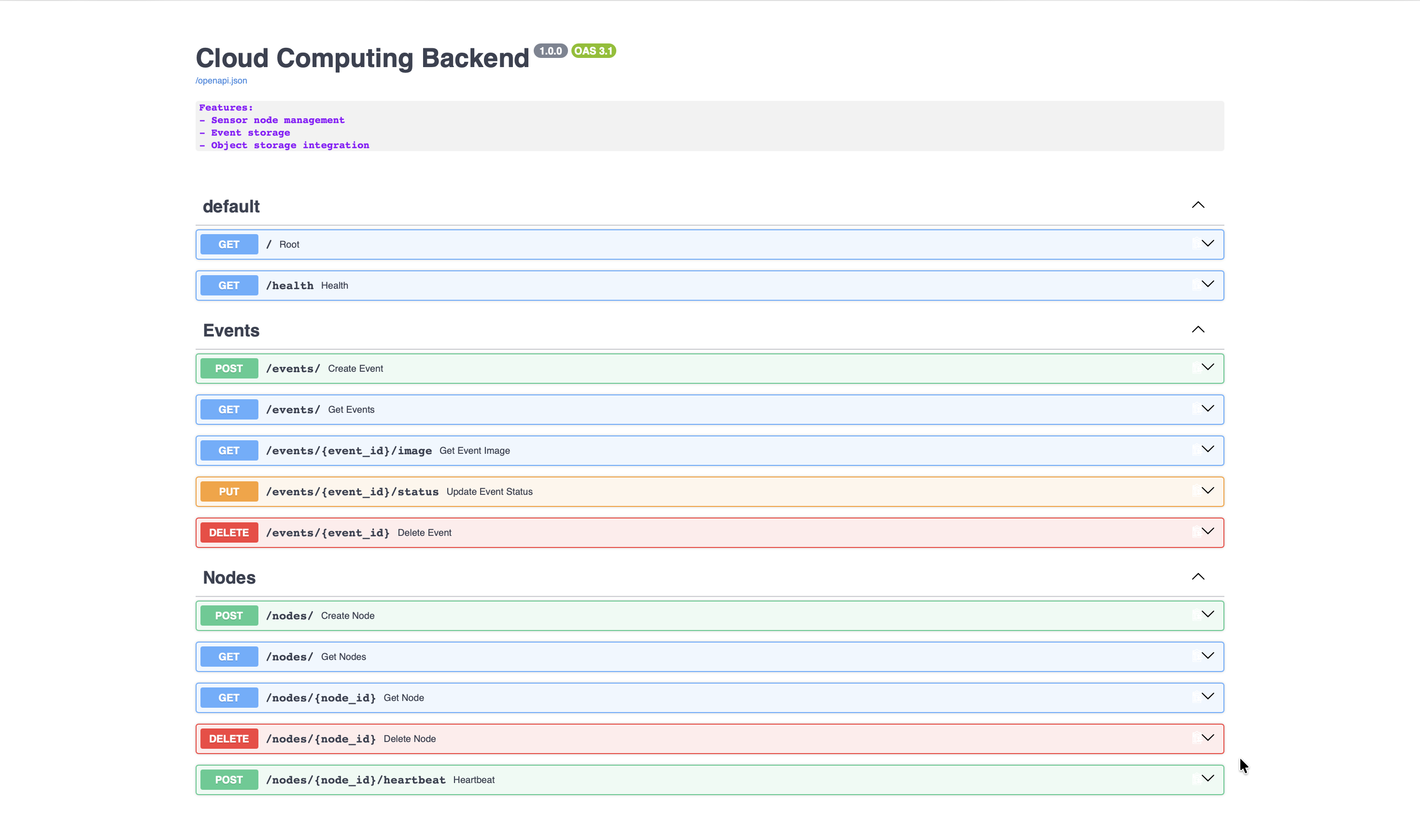
The API supports sensor-node registration and heartbeat monitoring, event uploads, event retrieval and filtering, image access through temporary URLs, status updates and deletion.
PostgreSQL Metadata Storage
PostgreSQL stores the metadata generated by the backend.
Below is a depiction of stored event records and registered node information in the events and nodes tables.
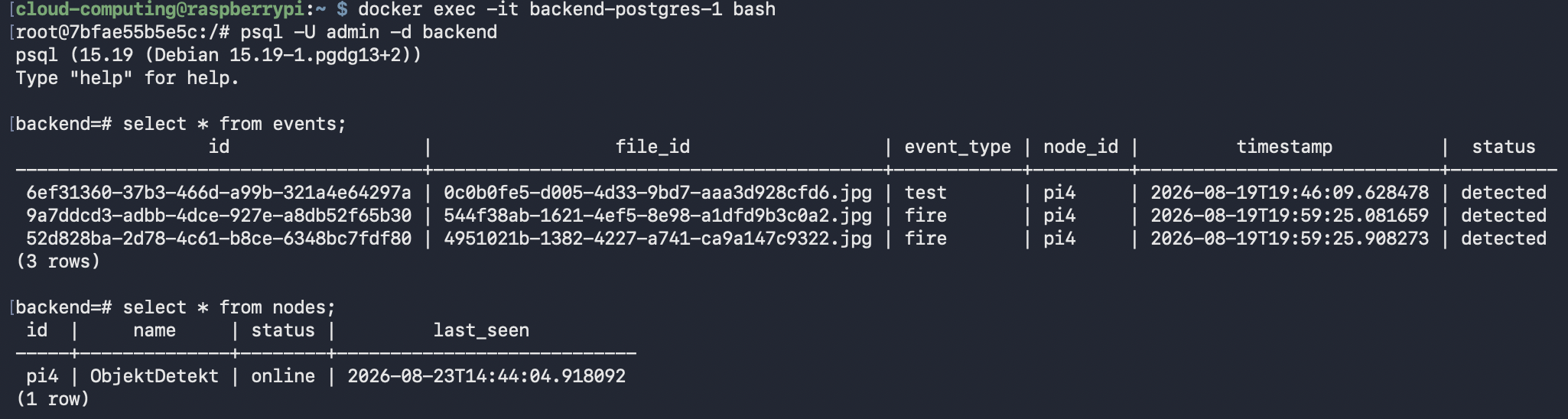
Each event contains a reference to its object-storage key, while the event type, node ID, timestamp and processing status remain queryable as relational data.
SeaweedFS Object Storage
SeaweedFS stores the event images through its S3-compatible interface.
The filer view below shows the events bucket and uploaded image objects.
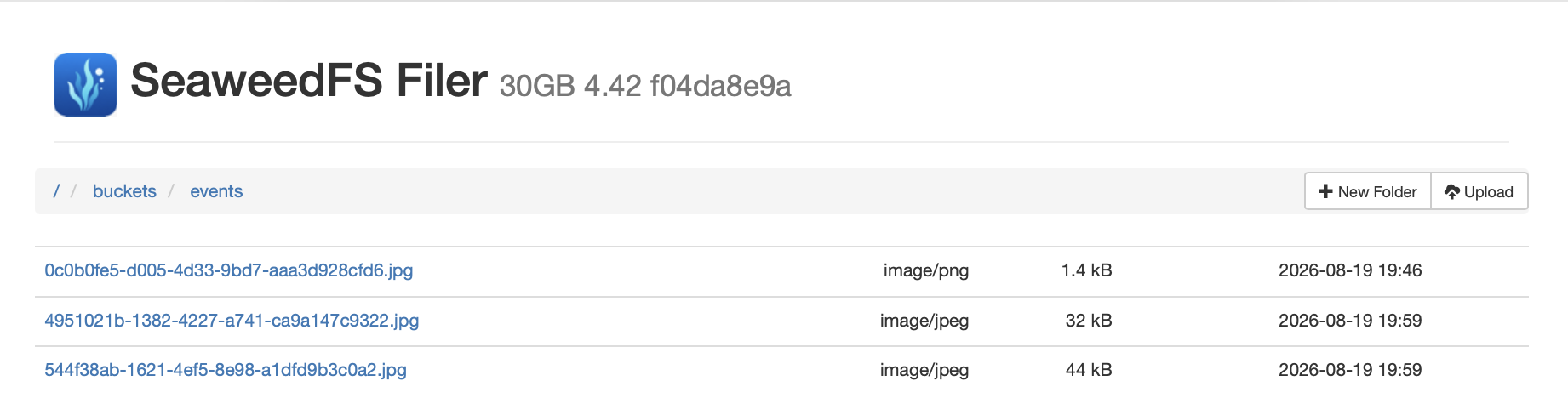
This separation allows the backend to keep metadata queries in PostgreSQL while storing binary image data in a distributed object-storage service.
The SeaweedFS volume services are configured as multiple replicas in the Docker Swarm stack, with object replication controlled by defaultReplication.
—
References
- Docker Documentation: https://docs.docker.com/
- Docker Swarm Documentation: https://docs.docker.com/engine/swarm/
- FastAPI Documentation: https://fastapi.tiangolo.com/
- PostgreSQL Documentation: https://www.postgresql.org/docs/
- SeaweedFS Documentation: https://github.com/seaweedfs/seaweedfs